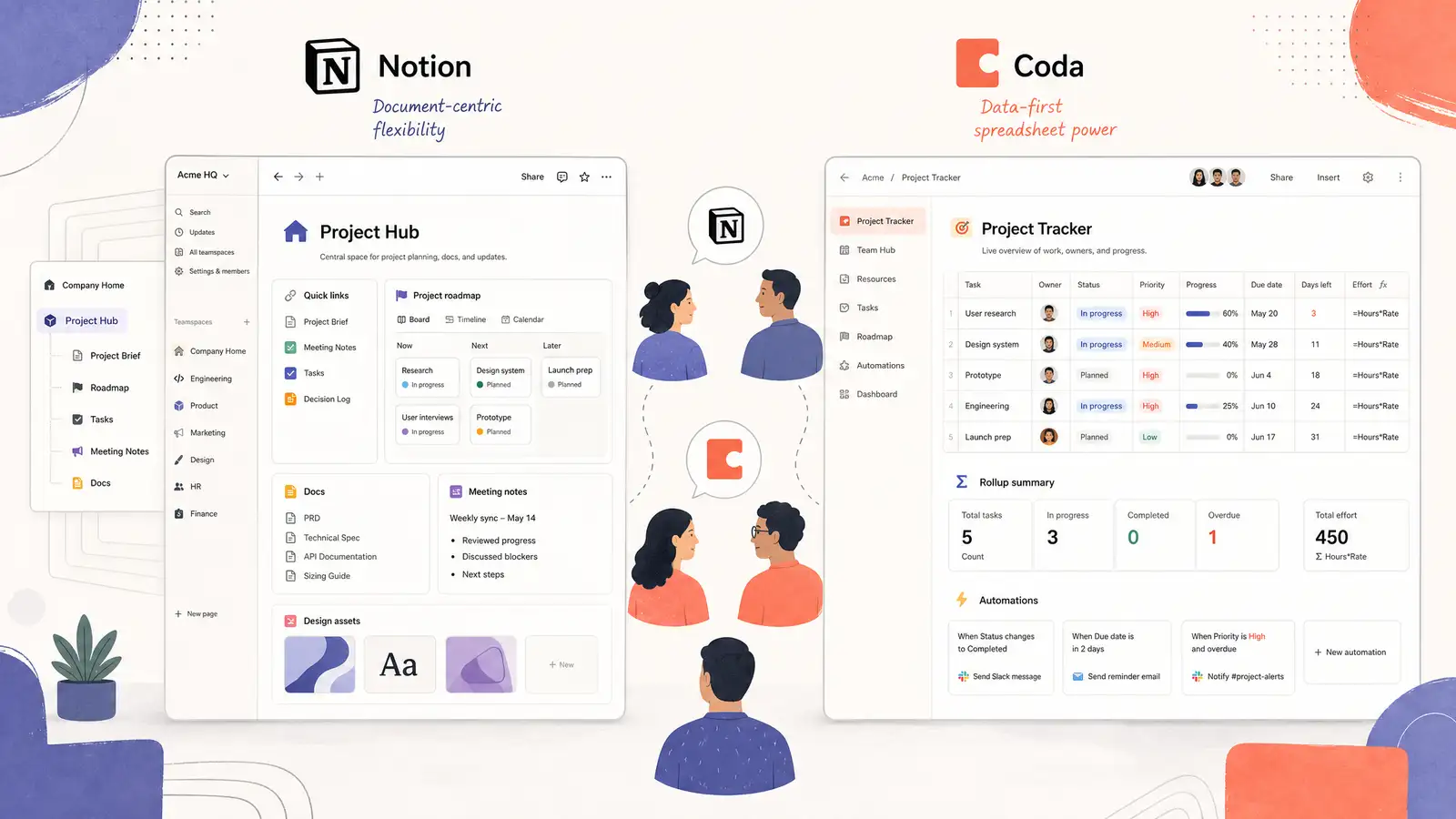
Notion and Coda occupy the same space in the productivity market: both want to be the only tool your team opens in the morning. Both combine documents, databases, and lightweight project management into a single canvas. Both have cult followings that will tell you the other tool is fundamentally broken.
The truth is more nuanced. Having used both across multiple teams and projects, here is where each one actually shines — and where each one trips over its own ambition.
The Core Philosophy
Notion is a document that can contain databases. Every page starts as a blank document. You type, format, and embed. When you need structure, you drop in a database — a table, board, calendar, or gallery — that lives inline with your text. The mental model is a wiki that grew teeth.
Coda is a database that can contain documents. Every doc starts as a table, and you build outward. Rows can expand into full pages. Columns can be formulas, lookups, or buttons that trigger automations. The mental model is a spreadsheet that learned to write.
This difference sounds subtle but shapes everything about how each tool feels to use. Notion rewards freeform thinking. Coda rewards structured thinking. If you start with a blank page and figure things out as you go, Notion feels natural. If you know exactly what data you need to track and want to build a system around it, Coda is more powerful.
Databases and Formulas
Coda’s tables are genuinely better than Notion’s. The formula language is richer — you can write conditional logic, cross-table lookups, and button-triggered automations that feel like lightweight programming. Coda Packs extend this further by connecting to external APIs, letting you pull Jira issues, Salesforce records, or GitHub pull requests directly into a table.
Notion’s databases are simpler and more approachable. Relations and rollups connect tables without requiring formula knowledge. The interface is cleaner, and the learning curve is shallower. But Notion’s formula system is limited compared to Coda’s, and there is no equivalent to Coda’s button-triggered automations.
If you need a lightweight CRM, an inventory tracker, or a team dashboard that pulls live data from multiple sources, Coda is the better tool. If you need a knowledge base with some structured data mixed in, Notion is more than enough.
Writing and Documents
Notion wins here. The editing experience is clean, fast, and pleasant. Block-based editing — where every paragraph, image, and embed is a draggable unit — makes reorganizing content effortless. The / command menu is fast enough that you rarely reach for the mouse.
Coda’s document editing is functional but feels secondary to the database features. Text formatting options are more limited. The canvas is less flexible for long-form writing and visual layouts. Coda is a place where documents support your data. Notion is a place where data supports your documents.
For team wikis, meeting notes, and project documentation, Notion is the clear winner.
Collaboration and Sharing
Both handle real-time collaboration well. Multiple people can edit the same page, leave comments, and @mention teammates. The differences are in permissions and pricing.
Notion’s free plan is generous: unlimited pages for up to 10 guests. Paid plans add unlimited file uploads and advanced permissions starting at $10 per user per month. Notion’s guest access is straightforward — share a page with anyone via link.
Coda’s free plan includes unlimited docs but charges for “Doc Makers” — people who create and edit docs. Viewers and commenters are free. The Maker pricing starts at $12 per user per month, which makes Coda more expensive for teams where everyone needs edit access.
For small teams or personal use, Notion’s pricing is friendlier. For teams that need Coda’s advanced database features, the extra cost may be justified.
Integrations and Automations
Coda has the edge here. Coda Packs connect directly to over 600 external services. Automations can run on a schedule, trigger from button clicks, or fire when data changes in a table. You can build a surprising amount of workflow logic without leaving Coda.
Notion’s integration story relies more on third-party tools like Zapier and Make. Notion’s native API is solid, and the ecosystem of Notion-connected tools is vast, but there is nothing equivalent to Coda Packs inside Notion itself.
If you want your workspace to be the hub that other tools feed into, Coda’s native integrations are more powerful. If you are comfortable wiring things together with Zapier, Notion can get you to the same place.
Verdict
For most teams starting fresh, Notion is the better default. The writing experience is superior, the learning curve is gentle, and the free plan is generous enough to get real work done before you commit money. If your primary use case is documentation, wikis, and lightweight project tracking, Notion does everything you need.
Choose Coda if your workflows are data-heavy and you want to build custom tools without code. Coda’s tables, formulas, and Packs make it feel less like a document editor and more like a platform for building internal apps. Teams that track sales pipelines, manage complex OKRs, or run operations out of a spreadsheet will find Coda is worth the steeper learning curve.